SOFTWARE
Dilonardo Photos Mix
Mixes many images together into one image.
DescriptionScreen ShotsSystem RequirementsDownloadFeedback
Description
Mixes 2 or more photos to one.
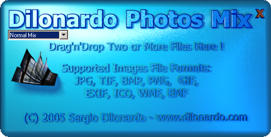
Just drag'n'drop 2 or more images/photos files from the Windows Explorer and this software will automatically mix all of them together and save the resulting picture to the same folder as the sources files.
Screen Shots
System Requirements
Processor
Running at 500 MHZ or better recommended
Memory
128 MB RAM
Hard Disk
At least 100 MB of free space
Display
True color (32 bits) recommended
Download


 Windows NT, 2000, XP or higher
If you get an error message when launching this software on operating systems prior to Windows XP, you certainly need to copy the Microsoft's GDIPlus.dll file in the same folder as the Photos Mix executable.
Feedback
If you would like to provide feedback or have any questions, please visit the contact page.